We tell small businesses every week that a slow, fragile website costs them customers. So it was only fair to look hard at our own.
hixfi.com ran on WordPress for years, with a page builder, a stack of plugins, and the usual layers of caching on top to keep it quick. It worked, mostly. But "mostly" included a caching plugin that crashed the site after a server update, and a memory cache that served blank error pages until we switched it off. Each time, the fix was another setting, another plugin, another thing to watch.
On October 22, 2026, we moved it to Vercel. Same pages, same content, same addresses. We did not do it because WordPress is bad: we maintain WordPress sites for a living and will keep doing so. We did it because, for a marketing site like ours, WordPress had become a lot of moving parts to keep a few pages fast and safe. Here is what happened, with our own numbers, and the honest list of businesses that should not do the same.
First, what is actually different
A WordPress site builds every page on request: a visitor arrives, PHP runs, the database is queried, plugins add their pieces, and the result is sent back. Caching plugins exist to skip that work as often as possible.
A site on Vercel, built with a framework like Next.js, does most of that work once, when the site is published. The finished pages sit on a global network of servers, close to whoever is asking for them. There is no database answering visitors and no plugin running per request. Anything that does need to be live, like a form, is a small, separate piece.
Almost every result below follows from that one difference.
The numbers
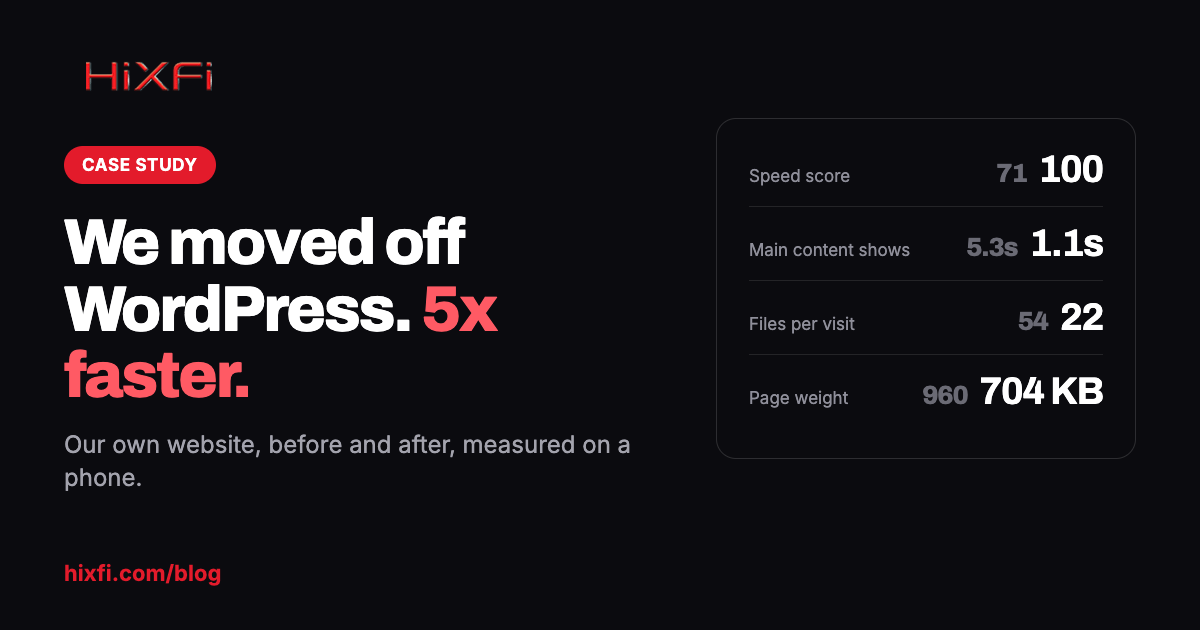
We tested the home page with Google Lighthouse, the same tool behind Google's PageSpeed score, in its mobile mode, three times each, and took the middle result.
| Before (WordPress) | After | |
|---|---|---|
| Google speed score on mobile | 71 | 100 |
| Time until the main content shows | 5.3 seconds | 1.1 seconds |
| Files loaded per visit | 54 | 22 |
| Page weight | 960 KB | 704 KB |
| Server response | about 1.9 seconds | about 0.2 seconds |
The one that matters most is the second line. Google's own research found that as load time grows from 1 to 5 seconds, the chance a phone visitor leaves goes up by about 90%. Our home page used to sit right at that 5-second mark. Now it's done in about a second.
To be fair about it: the pages were rebuilt during the move, so not every point of that gain belongs to the platform. But the server response is pure platform, and so is the fact that the score now holds without a caching plugin propping it up.
What we actually changed
We kept everything that was working. Every page kept its exact address, so links from Google, social posts and old emails still land in the right place. Titles, descriptions and the data Google reads stayed the same. Forms, analytics and the chat all came along.
We removed what was slowing it down. A page builder adds a lot of code to every page, whether the page uses it or not. Plugins each load their own files. We rebuilt each page so it loads only what it needs: 22 files instead of 54.
We moved to faster hosting. Pages are ready before anyone asks for them, so the server answers in a fifth of a second instead of nearly two.
There was no downtime. The old site stayed live until the new one was ready, and the switch took minutes. We kept the old site running for two weeks as a backup, just in case.
What else got better
Nothing left to update
Our WordPress site needed a steady stream of core, theme and plugin updates, and some of them bit back. Besides the two crashes above, a page-builder cache kept showing old versions of edited pages, and WordPress's built-in scheduler caused load spikes that slowed every other site on the same server. None of that exists anymore. There are no plugins to update, no PHP version to keep current, and no database to optimize. The time we used to spend keeping the site running now goes into improving it.
A much smaller target
Most hacked WordPress sites are not hacked through WordPress itself. They are hacked through an outdated plugin, or through endless password guessing at the login page. After the move there is no login page, no admin dashboard, no plugin code and no database facing the internet. Visitors receive finished pages. This does not make a site invincible: the domain, the DNS and the accounts behind them still need protecting. But the everyday attack surface shrinks to almost nothing.
Mistakes are reversible in seconds
Every publish is a complete, separate version of the site. If a change goes wrong, rolling back is one click to the previous version, not a restore from last night's backup and a hope that the database matches the files.
Full control over what Google and AI tools read
On WordPress, what ends up in a page's code depends on the theme, the SEO plugin and every other plugin that injects something. Now we control the titles, descriptions, structured data, the sitemap and the files AI assistants read, like llms.txt. Every page also gets its own share image, made automatically when the site is published.
What it cost us
The move was a real project, not a button:
- Every page was rebuilt. Seventy-five addresses, each checked against the old version so no text, heading or link went missing.
- Every old address had to keep working. Old links, old blog addresses and even WordPress's numbered links now redirect permanently to the right page.
- Forms and tracking were moved deliberately. Contact, proposal and support forms post straight into our CRM. Analytics and ad tags were checked one by one after the switch.
- Editing works differently. There is no WordPress dashboard. Content changes go through us, or through a headless CMS if a client wants to edit their own pages.
Who should stay on WordPress
For a lot of small businesses, WordPress is still the right answer. Stay put if:
- You sell online with products, carts and payments.
- You run courses or memberships with student or member accounts.
- Your site depends on plugins for bookings, directories or custom features the business relies on. Rebuilding them costs far more than maintaining them.
- You edit your own pages often. If staff update menus, prices or listings several times a week and like doing it themselves, the WordPress editor earns its keep.
But most small business websites are a handful of pages: what you do, where you are, how to reach you. For those, the move is quick, and the speed gain is large.
- Does your site sell products online (cart and checkout)?
- Does it have courses, members or student logins?
- Does it depend on a custom-built plugin or platform?
If you do migrate, do not skip these
- Keep every old address working, or redirect it permanently to its new page.
- Carry over every title, description and piece of structured data, not just the visible text.
- Test every form end to end, all the way to the inbox or the CRM.
- Move the analytics and ad tags, then check that they are actually firing.
- Submit the new sitemap in Google Search Console and watch it for a few weeks.
- Leave your email settings alone. Changing where the website lives should not touch the records that deliver your mail.
- Keep the old site running, untouched, until you are sure.
Want the same for your site?
When you join any HiXFi website care plan, we'll redesign your site and move it to the same fast hosting for free. That covers up to 8 pages, your content moved over, the speed setup, and no downtime. Plans run month to month.
Not sure where your site stands? Run the free website audit first. It takes about a minute.
Want this handled for you? See our WordPress maintenance plans.